How to Advertise on Facebook in 2026: A Step-by-Step Guide for Business Owners
Advertising on Facebook is easy to start and easy to waste money on. You can have an ad running in fifteen minutes - and burn a month’s budget on clicks that never become customers just as fast. This guide walks you through the whole thing the right way: the accounts and pixel you set up first, the one objective choice that quietly decides everything, how targeting really works in 2026, what to budget, and the funnel that turns a Facebook lead into a paying client instead of a dashboard number.
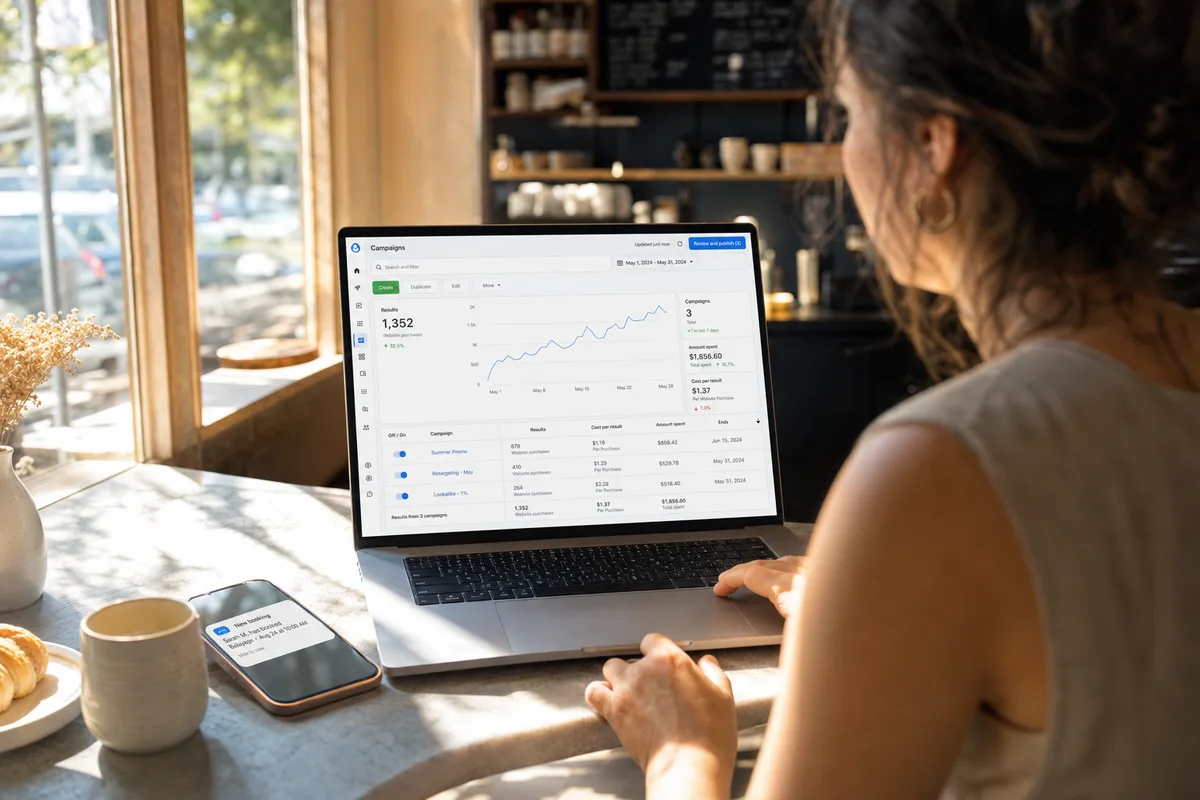
Can you advertise on Facebook yourself in 2026?
Yes. You do not need an agency or a marketing degree to advertise on Facebook. The platform is genuinely self-serve, and with roughly 3 billion monthly users it remains the most cost-efficient paid channel for local and service businesses: the average cost per lead across industries is $27.66, versus $70.11 on Google Ads (WordStream 2025).
What has changed is where the difficulty lives. The button-clicking is simple. The hard part is the strategy underneath it - choosing the right objective, giving the algorithm creative it can actually use, and following up fast enough to turn interest into a sale. The mechanics in this guide are the same whether you sell products, fill events, or book appointments. The follow-up and funnel advice near the end is sharpest for businesses that close over a call or a booking - coaches, clinics, tradespeople, real estate - because that is where cheap clicks most often fail to become revenue. Get the fundamentals right and one person can run profitable Facebook ads without an agency.
What you need before you run your first ad
Set these five things up once, in order, before you spend a dollar. Rushing past them is the most common reason a first campaign never optimizes.
- A Facebook Page for your business. Ads run from a Page, not a personal profile. It should look real - profile photo, cover image, a clear description of what you do.
- A Meta Business account (business.facebook.com). This is the control room that holds your Page, your ad account, and your billing in one place, separate from your personal profile.
- The Meta Pixel plus the Conversions API. The pixel is a snippet on your website that reports what visitors do; the Conversions API (CAPI) is the server-side version that keeps reporting even when browsers block the pixel. Together they are how Meta learns who converts. Setting them up now, before you launch, is non-negotiable - an account that starts blind never catches up.
- A payment method and a verified domain. Add a card to the ad account and verify your website domain in Business settings so your conversion events are trusted.
- A real offer and a place to send people. Decide what you are actually asking for - a booked call, a free quote, a consultation - and have a page or booking link ready to receive it. The ad is only as good as what it points to.
How to advertise on Facebook, step by step
Here is the full path from empty account to live campaign. The mechanics take minutes; spend your attention on steps 2, 4, and 7 - they are where money is won or lost.
Step 1 - Create the campaign. In Ads Manager click Create. Meta groups everything into three levels: the campaign (your goal), the ad set (budget, audience, placements), and the ad (the actual creative). Keep it to one campaign with one or two ad sets when you start - splitting a small budget across many ad sets starves each one of data.
Step 2 - Choose the right objective. This is the single most important choice in the whole process. Facebook will happily push you toward “Traffic” or “Engagement” because those goals are cheap and make the numbers look busy. Do not. For a service business you almost always want Leads or Sales, so the algorithm optimizes for people likely to convert, not people likely to click. The wrong objective is why so many accounts get a flood of clicks and zero customers.
Step 3 - Define your audience. In 2026, under Meta’s Andromeda-era system, granular interest targeting is largely deprecated - the creative does the targeting now. Start broad: your location, a wide age range, and let Meta’s engine find the buyers based on who responds. A tight “45-year-old yoga-interested women within 10 miles” audience usually performs worse than a broad one paired with a sharp, specific ad. Add a Custom Audience of past customers to build a lookalike once you have data.
Step 4 - Build creative that names the problem. Because creative is the targeting, a vague “Best prices in town, book now” ad tells the algorithm nothing and gets shown to everyone. A specific ad that names one person’s exact problem - “Knee pain keeping you off the trail at 50?” or “AC died in the July heat?” - pulls the right people and repels tire-kickers. Write to one buyer, lead with their pain, and make the next step obvious. Specific creative is also cheaper creative, because relevance lowers your cost.
Step 5 - Set your budget. Enter a daily or lifetime budget at the ad-set level. Plan for a minimum of about $1,200-$1,500 per month (roughly $40-$50 a day). That is not arbitrary: Meta’s algorithm needs roughly 50 conversion events per week to exit its “learning phase” and optimize reliably. Below that it never gathers enough signal, and you pay all month for an education instead of results.
Step 6 - Launch and leave it alone. Set your placements to Advantage+ (let Meta distribute across feed, Reels, and Stories), submit for review - most ads are approved within 24 hours - and then resist the urge to tinker. The first 7-14 days are the learning phase; editing an ad set resets it. Let it gather data before you judge anything.
Step 7 - Measure the number that matters. Ads Manager will show you clicks, CTR, and cost per lead. None of those pay your bills. Track cost per booked call and cost per paying client instead. A campaign showing a “great” $18 lead cost can hide a $340 cost-per-client once you count who actually answered, booked, and paid - and that is usually the campaign a beginner would have scaled. A $20 lead who never answers is more expensive than a $60 lead who books and shows up.
How to write a Facebook ad that converts
The creative is now the most important lever you control, so it is worth getting the basics right. A Facebook ad has three parts a beginner should focus on: the image or video, the primary text (the caption above it), and the headline (the bold line by the button).
Format first: a single clear image or a short 6-15 second vertical video (1080x1350 for feed, 1080x1920 for Reels and Stories) covers almost every case. You do not need a studio - a real, specific photo usually beats a polished stock image, because it looks like a person and not an ad.
For the copy, lead with the problem, not your business. Two quick before-and-after rewrites:
- Weak: “We offer professional physiotherapy with years of experience. Book today!” Stronger: “Knee pain every time you take the stairs? Most people wait a year longer than they should. Free 15-minute assessment this week.”
- Weak: “Top-rated HVAC company, great prices, call now.” Stronger: “AC out in this heat? We can usually have someone at your door same day. Tap to check today’s slots.”
The pattern: name one person’s exact problem in the first line, promise one clear next step, and keep it short. Write it the way you would text a friend who has that problem, then point the button at a single action.
How much does it cost to advertise on Facebook?
You control the budget, so the real question is efficiency, not a fixed price. The 2026 benchmarks from WordStream, the most authoritative public dataset, look like this:
| Metric | Facebook average | What it means |
|---|---|---|
| Cost per click | $0.70 | Cheap reach; weak as a goal on its own |
| Cost per lead | $27.66 | A form-fill or contact, up ~21% year over year |
| Click-through rate | 2.59% | About 26 clicks per 1,000 people reached |
| Conversion rate | 7.72% | Share of clicks that become a lead |
| CPM (1,000 views) | $17.12 (Q1) to $28.09 (Q4) | Cheapest early in the year, priciest at the holidays |
Source: WordStream/LocaliQ Facebook Ads Benchmarks 2025.
Cost per lead swings hard by industry - roughly $3 for a restaurant up to $77 for a dentist. For the full vertical-by-vertical breakdown and the budgeting math, see how much Facebook ads cost.
Why most Facebook ads fail (and how to fix it)
Almost every “Facebook ads don’t work” story traces back to the same three fixable errors. They are not about the platform; they are about the funnel around it.
Optimizing for form fills instead of booked appointments. A form fill is the easiest thing for Meta to deliver, so if you ask for it, you get it - tire-kickers included. Only 20-30% of form-fill leads even answer the phone. Switch the ask to a booked call or calendar slot and cost per lead rises while cost per client falls, because 80-85% of people who book their own time actually show up, versus 50-60% of form-fills.
Being too slow to follow up. A Facebook lead is interested, not ready. Speed decides everything: a text within 60 seconds (“Hi, saw you were interested - want to grab a time this week?”) linking straight to a booking calendar, plus two reminders before the slot, is the difference between a booked call and a ghost.
Never closing the loop. By default Meta optimizes toward form-fillers because that is the last event it saw. When you send your real outcomes - who actually became a paying client - back through the Conversions API, the algorithm learns what a buyer looks like and goes hunting for more of them. Meta’s own data shows the API drives around 18% lower cost per result on average, and once you optimize on closed deals rather than raw leads, businesses typically see cost per client improve 20-30% within 90 days. Most DIY advertisers never set this up, which is why a well-run system often gets cheaper clients over time while a manual account stays stuck at its launch numbers.
The faster way: let a system run the hard parts
You can do every step above yourself - many owners do. But the parts that decide profitability (a sharp ideal-client profile, a correctly structured campaign, the CAPI closed loop) are also the parts that take real expertise and time. The traditional answer was to hire an agency at a $1,500-$3,000+ monthly retainer and hope you are not one of dozens of forgotten accounts.
There is now a third option between fully DIY and a retainer: run the ads yourself on a system that does the strategist, copywriter, and campaign-manager work for you, inside your own ad account. That is what Camply was built for, and it runs on the same three-loop logic this guide describes:
- Hit the exact pain. An AI ideal client profiler builds the psychology-based profile that makes creative specific enough to lower costs.
- Warm the lead to buying-readiness. An AI campaign builder sets up the structure and the booked-call funnel that filters for intent instead of harvesting contacts.
- Close the loop. Offline conversion optimization reports every closed client back to Meta, so it stops chasing curiosity and starts finding buyers.
You keep control and transparency without becoming a media buyer or paying a retainer. For a full walkthrough of the DIY-versus-system tradeoff, read how to run your own Meta ads.
Frequently asked questions
How do I start advertising on Facebook as a beginner?
Set up a business Facebook Page, create a Meta Business account, and install the Meta Pixel plus the Conversions API on your site. Then in Ads Manager choose the Leads or Sales objective (not Traffic), target a broad local audience, write one specific ad that names your customer’s problem, set a daily budget of around $40-$50, and send responders to a booked-call funnel rather than a bare form.
How much does it cost to advertise on Facebook?
You set the budget, so there is no fixed price, but plan for a realistic minimum of about $1,200-$1,500 per month so Meta’s algorithm gets the ~50 weekly conversions it needs to optimize. Average cost per lead is $27.66 across industries, ranging from roughly $3 for restaurants to $77 for dentists.
Which Facebook ad objective should a business choose?
For most service and local businesses, choose Leads or Sales. Those tell Meta to optimize for people likely to convert. Avoid Traffic and Engagement objectives as your main goal - they are cheap and produce clicks and likes that rarely turn into customers.
Do Facebook ads actually work in 2026?
Yes, for the right business run the right way. Facebook is the lowest-cost-per-lead major channel, but it creates demand rather than capturing it, so the leads need a fast follow-up and booked-call funnel to convert. Businesses that treat cheap Facebook leads like ready-to-buy Google searchers are the ones who say it does not work.
How long before my Facebook ads start working?
Budget 60-90 days. The first 1-2 weeks are Meta’s learning phase, weeks 3-8 are where you gather enough data to optimize creative and audiences, and the closed-loop CAPI advantage compounds over the following months. Judging a campaign after two weeks is the most common and most expensive beginner mistake.
Do I need a website to advertise on Facebook?
Not strictly - you can use Facebook’s native lead forms that open inside the app. But a simple landing page plus the pixel and Conversions API gives you far better tracking and a stronger booked-call funnel, which is what actually turns leads into clients. If you use native lead forms, pair them with instant follow-up. See lead forms vs landing pages.
Advertising on Facebook in 2026 is genuinely within reach for any business owner. The platform is self-serve, the costs are the lowest of any paid channel, and the steps are learnable in an afternoon. The owners who make money are the ones who choose the right objective, feed the algorithm specific creative and real outcomes, and judge the account by booked clients instead of clicks. Start a free trial of Camply and launch campaigns that optimize for paying clients from day one.
Sources: CPC, CPL, CTR, CVR and CPM benchmarks from WordStream/LocaliQ Facebook Ads Benchmarks 2025. Google Ads CPL comparison via Search Engine Land. Conversions API average lift from Meta for Business. Form-fill contact and appointment show-up rates from industry booking data.
Related Articles
AI Facebook Ads in 2026: What AI Actually Does (and What It Still Can't)
A clear, honest guide to AI Facebook ads in 2026 - how Meta's own AI (Andromeda and Advantage+) now runs delivery, which AI tools you actually control, what AI does brilliantly, what it still can't do, and how to use it to book clients instead of burning budget.
Best AI Marketing Tools for Local Service Businesses (2026)
We evaluated 5 AI marketing tools through the lens of what service businesses actually need: ICP profiling, booked-call funnels, and closed-loop revenue optimization. Here's what each tool actually does — and what it doesn't.
Do Facebook Ads Work in 2026? An Honest, Data-Backed Answer
Do Facebook ads still work in 2026? A straight, data-backed answer for business owners: the real numbers, who they work for, why so many people say they don't, and the one thing that makes them profitable.
Facebook Ads for Auto Repair Shops (2026): Book High-Value Jobs, Not Oil-Change Coupons
Most auto repair Facebook ads attract coupon-hunters who never come back. Here's how to structure campaigns that win the trust of car owners and book the high-margin diagnostic, brake, and major repair work that actually grows the shop.
Facebook Ads for Chiropractors (2026 Guide)
Most chiropractic Facebook ads generate cheap leads that never book an appointment. Here's the strategy that aligns campaigns with how patients actually choose a chiropractor — and how to build a funnel that drives real consultations and revenue.